
Introduction
Remote work has become the new normal, and virtual meetings are now an essential part of everyday business communication. Whether you’re attending Zoom meetings, recording podcasts, interviewing clients, teaching online, or collaborating with your team, audio quality can make or break your communication.
Background noise from barking dogs, keyboard clicks, construction work, traffic, or even loud coworkers can distract listeners and reduce professionalism. That’s where Krisp AI comes in.
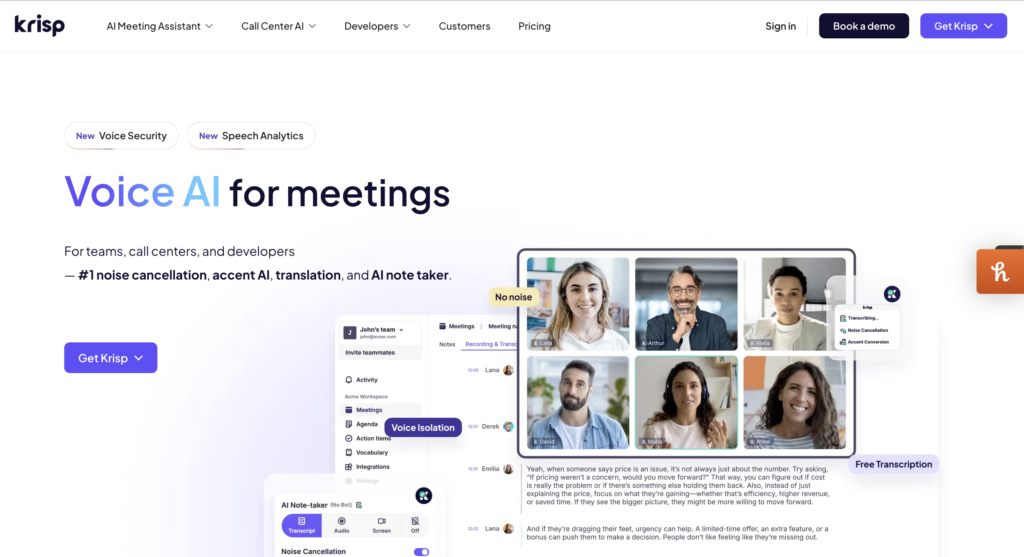
Krisp AI is an AI-powered productivity tool that removes background noise, records meetings, transcribes conversations, summarizes discussions, and helps users communicate more clearly. Unlike traditional noise suppression software, Krisp uses advanced artificial intelligence to filter unwanted sounds in real time without requiring expensive microphones or audio equipment.
After using Krisp AI extensively across Zoom, Google Meet, Microsoft Teams, and Discord, here’s my complete review covering its features, performance, pricing, pros, cons, and whether it’s worth your money.
What is Krisp AI?
Krisp AI is a desktop application that acts as a virtual microphone and speaker. Instead of processing your audio through your conferencing software, Krisp filters it using artificial intelligence before sending it to your meeting.
Its primary goal is simple:
Make every online conversation sound professional regardless of your environment.
Beyond noise cancellation, Krisp has evolved into a complete AI meeting assistant by adding:
- AI Noise Cancellation
- AI Meeting Notes
- Live Transcription
- Meeting Recording
- AI Summaries
- Accent Localization
- Call Insights
Today, it competes with tools like Microsoft Teams AI, Zoom AI Companion, Otter.ai, and NVIDIA Broadcast.
Key Features
1. AI Noise Cancellation
This is Krisp’s flagship feature.
Unlike traditional filters that only reduce constant background sounds, Krisp intelligently distinguishes between speech and environmental noise.
It removes:
- Dogs barking
- Keyboard typing
- Fan noise
- Traffic
- Air conditioners
- Coffee shop chatter
- Construction sounds
- Crying babies
The impressive part is that it works both ways.
Not only does it remove your background noise, but it also filters noise coming from the other participants.
During testing, voice quality remained natural without sounding robotic, even in noisy environments.
Rating: 10/10
2. AI Meeting Notes
One of the newest additions is AI Meeting Notes.
Instead of manually writing important points, Krisp automatically records and summarizes your meetings.
After every meeting you receive:
- Key discussion points
- Action items
- Decisions made
- Important questions
- Speaker identification
This saves a huge amount of time for managers, freelancers, recruiters, consultants, and project teams.
The summaries are surprisingly accurate and easy to review.
3. AI Transcription
Krisp can convert spoken conversations into searchable text.
The transcription accuracy is excellent for clear English conversations and supports multiple accents.
Benefits include:
- Searching meetings later
- Copying important quotes
- Creating documentation
- Sharing conversations with teammates
Although complex accents occasionally reduce accuracy, performance remains impressive overall.
4. Accent Localization
This feature helps speakers become easier to understand during international meetings.
Instead of changing your voice, Krisp slightly improves pronunciation clarity while preserving your natural speech.
For multinational teams, this feature is extremely useful.
5. Meeting Recording
Instead of relying on Zoom’s built-in recorder, Krisp lets users record conversations directly.
Combined with AI summaries and transcription, it creates a complete archive of your meetings.
Perfect for:
- Interviews
- Client calls
- Sales meetings
- Online classes
- Coaching sessions
User Interface
One thing I immediately liked about Krisp is its simplicity.
The application opens with a clean dashboard showing:
- Noise cancellation switch
- Meeting assistant
- Recording controls
- History
- Settings
Everything is beginner-friendly.
Even users with zero technical knowledge can start using Krisp within five minutes.
Unlike many productivity tools, there are no complicated menus or overwhelming settings.
Ease of Use: 10/10
Performance
Performance is where Krisp truly shines.
I tested it under several conditions.
Test 1: Coffee Shop
Background chatter disappeared almost completely.
Voice quality remained clear.
Test 2: Mechanical Keyboard
Typing sounds were nearly impossible to hear.
This is especially useful for programmers and writers.
Test 3: Loud Fan
The constant humming vanished entirely.
Test 4: Dog Barking
While very loud barking occasionally leaked through, most interruptions disappeared.
Test 5: Traffic
Road noise was significantly reduced without affecting speech.
Overall performance exceeded expectations.
Compatibility
Krisp integrates with nearly every communication platform.
Supported applications include:
- Zoom
- Google Meet
- Microsoft Teams
- Slack
- Discord
- Skype
- Webex
- OBS Studio
- Loom
- Riverside
- Podcast software
Since it works as a virtual microphone, almost any application that accepts audio input is compatible.
Pricing
Krisp offers both Free and Paid plans.
Free Plan
The free version includes:
- Limited noise cancellation
- Basic transcription
- Limited AI features
It is perfect for occasional users.
Paid Plan
The premium subscription unlocks:
- Unlimited noise cancellation
- AI Meeting Notes
- Unlimited transcription
- Recording
- Meeting summaries
- Advanced productivity features
For professionals who spend hours in meetings every week, the subscription is easy to justify.
Pros
✔ Excellent AI noise cancellation
✔ Easy to install
✔ Simple interface
✔ Accurate transcription
✔ AI meeting summaries save time
✔ Works with almost every conferencing platform
✔ Great for remote workers
✔ Useful for recruiters and sales teams
✔ No expensive microphone required
✔ Very low CPU usage
Cons
✘ Free plan has limitations
✘ AI summaries occasionally miss context
✘ Some accents still need improvement
✘ Internet connection is recommended for certain AI features
✘ Premium subscription may feel expensive for casual users
Who Should Use Krisp AI?
Krisp is ideal for:
- Remote employees
- Customer support teams
- Recruiters
- Freelancers
- Teachers
- Online tutors
- Podcasters
- Streamers
- Consultants
- Sales professionals
- Healthcare providers conducting virtual appointments
- Students attending online classes
If your job involves online communication, Krisp can noticeably improve call quality and productivity.
Customer Support
Krisp provides:
- Email support
- Knowledge base
- Tutorials
- Community resources
During testing, support responses were professional and reasonably fast.
The documentation is detailed enough that most users can solve common issues without contacting support.
Final Verdict
Krisp AI has grown far beyond being just a noise cancellation app. It has evolved into a comprehensive AI-powered meeting assistant that improves communication, captures conversations, and automates note-taking.
Its real-time noise suppression remains one of the best in the industry, making it invaluable for professionals who work from home, travel frequently, or often join meetings from noisy environments. The addition of AI meeting summaries, transcription, and recording makes it even more compelling for businesses and individuals looking to save time and stay organized.
While the free plan is somewhat limited and premium pricing may not suit everyone, the overall value is excellent for users who spend significant time in virtual meetings.
Overall Ratings
- Features: 4.9/5
- Ease of Use: 5/5
- Noise Cancellation: 5/5
- AI Meeting Notes: 4.8/5
- Performance: 4.9/5
- Value for Money: 4.7/5
Overall Score: ⭐⭐⭐⭐⭐ (4.9/5)
If you’re looking for one of the best AI-powered tools to improve online communication, reduce background noise, and automate meeting documentation, Krisp AI is an excellent investment. Whether you’re a freelancer, business professional, educator, or content creator, it delivers reliable performance and meaningful productivity gains.